Your Login Works. Your Authentication System Might Not.
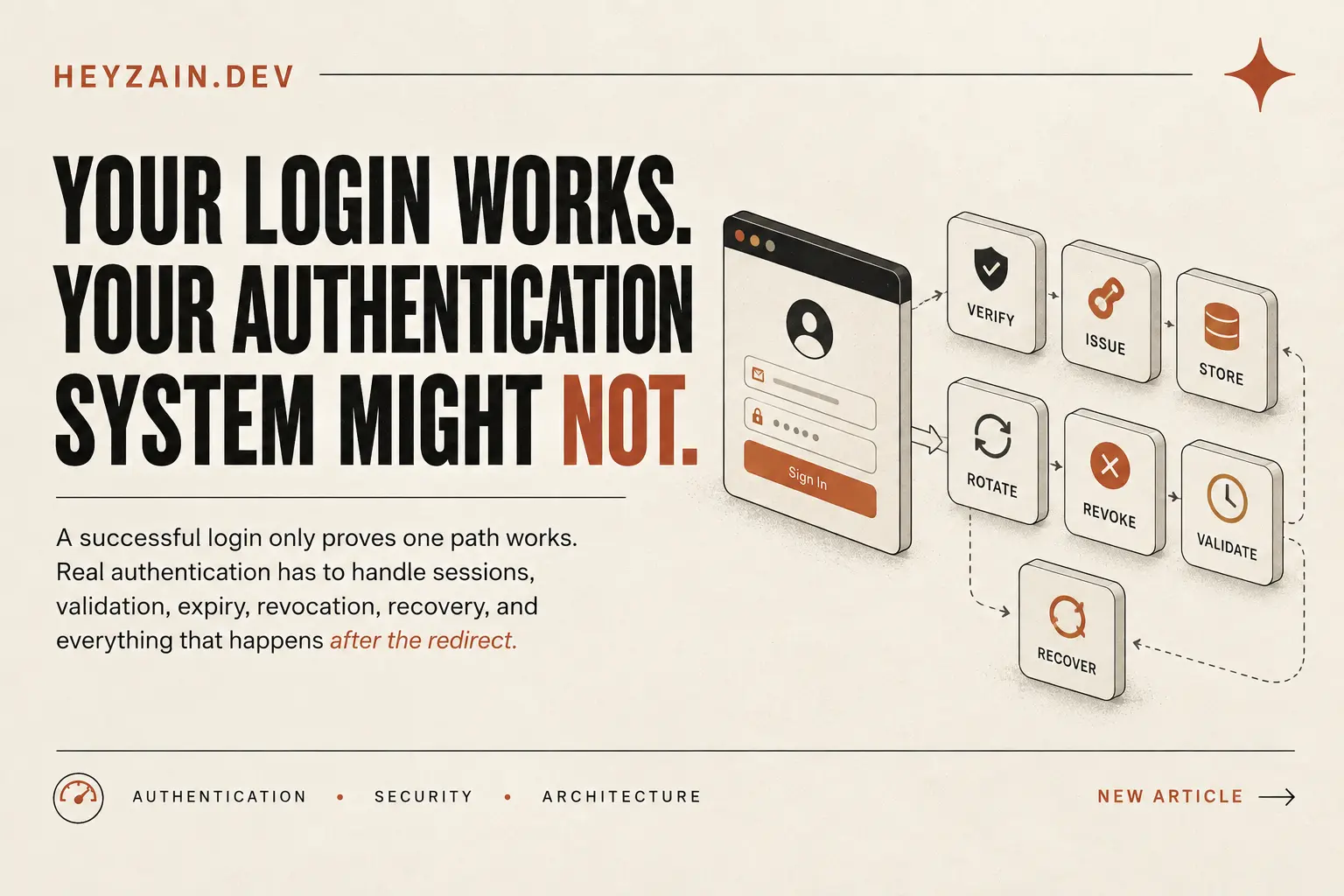
A successful login only proves one path works. Real authentication has to handle sessions, validation, expiry, revocation, recovery, and everything that happens after the redirect.
The Core Principle
Login is an event. Authentication is a system. A successful login only proves that one credential path functioned at a single moment in time. Real production authentication is a continuous state-management and access-control lifecycle that must maintain, evaluate, rotate, revoke, and recover trust over time.
The Login Screen Is the Easy Part
A login form is deceptively reassuring.
You enter an email. You enter a password. You click Sign in. The server accepts the credentials and redirects you to the dashboard.
From the outside, everything looks correct.
But that flow only answers one question: Can these credentials successfully create an authenticated state?
It doesn't answer what happens afterward:
- What happens when the same account opens another browser?
- What happens when the session expires?
- What happens when the user clicks “Log out of all devices”?
- What happens after a password reset?
- What happens if an old credential is stolen?
- What happens when a protected API receives a request from a session that should no longer exist?
Those are authentication questions too. And they are usually where the most critical production bugs and security holes hide.
A Login Success Is Only the Beginning
The common mistake is treating authentication as a screen. A better engineering mental model is a complete lifecycle:
VERIFY
Validate identity against salt, hash, OAuth provider, or WebAuthn.
ISSUE
Mint cryptographically secure session ID or scoped token pair.
STORE
Persist session state in database, Redis, or signed HTTP-only cookie.
VALIDATE
Check identity, TTL, and revocation on every protected route.
ROTATE
Exchange refresh tokens atomically and detect reuse attacks.
REVOKE
Invalidate server-side session across devices on demand.
RECOVER
Reset credentials and terminate existing active access.
ABUSE
Throttle repeated failed attempts and alert on anomalies.
Login is merely an entry gate into steps 01 & 02. The real system runs continuously from step 03 through 08.
Once credentials are verified, the system must establish some representation of access. That access then needs rules:
Who does this session belong to?
Can the server uniquely identify the subject on every call?
Is this session still valid right now?
Has it crossed its natural TTL or been explicitly killed?
Can it be revoked across all devices?
Can a user click 'Logout Everywhere' and actually enforce it?
What happens during recovery?
Does changing a password invalidate existing sessions or leave them open?
This changes how I review an authentication implementation. Instead of asking: “Does login work?”, I ask: “Can I explain the complete lifecycle of access?”
The Happy Path Hides Most of the System
Most authentication tests naturally follow the path of least resistance:
How most tutorials and quick tests evaluate authentication:
Where the fragile assumptions and real security bugs actually emerge:
The second sequence is where the architecture's true assumptions become visible.
For example, suppose a user logs in successfully and receives a session. Later they click: “Log out of all devices.”
The frontend can clear its local storage. The UI can redirect to /login. The toast can announce “Logged out successfully.”
None of those things invalidate the session on the server.
If the old session token or cookie can still authenticate a protected request, the interface is lying: the UI says one thing, but the authorization layer says another.
The Server Has to Be the Authority
This is one of the most fundamental distinctions in authentication:
“Clearing client state is not the same thing as revoking server-side access.”
Imagine two browsers using the same account:
Browser A (Desktop) Browser B (Laptop / Phone)
│ │
├── [Authenticated] ├── [Authenticated]
│ │
├── "Revoke all sessions" ────────► │
│ │ │
│ ▼ │
│ Server invalidates in DB/Redis│
│ │
│ ├── GET /api/user/profile
│ │ ▼
│ └── 401 Unauthorized (Blocked!)
The critical part isn't that Browser B's UI changed. The critical part is that the server authoritatively rejected Browser B's old session.
This is why authentication cannot be designed entirely from the frontend. A browser can display “You are logged out”, but only the authorization layer can enforce “This session is dead.”
The client can forget a session. The server must decide whether that session still exists.
Every Protected Request Needs a Reason to Be Trusted
Once authentication becomes a lifecycle, another question appears: How does the application validate access after login?
A common architectural mistake is allowing the frontend to become the source of truth. For example:
That state is useful for rendering UI buttons or hiding navigation links. It should never be the final authority for protected data or operations.
The real boundary is the protected API endpoint. Conceptually:
The frontend can hide a page. The server must protect the data behind it.
Session Storage Is Part of Authentication
After verification comes issuance and storage. This is easy to overlook because the login flow makes the session feel like a single scalar value:
In reality, the system needs to define what that session represents and how it can later be evaluated. A robust session record conceptually contains:
Cryptographically random, high-entropy unique identifier.
Foreign key linking the session to the authenticated subject.
Absolute timestamps bounding session validity.
Timestamp recorded when access is terminated prematurely.
Global account epoch incremented on password changes.
Context for user audit screens and anomaly detection.
If a credential is only valid according to its creation timestamp and expiry timestamp, but there is no meaningful revocation mechanism, then “log out everywhere” becomes impossible to enforce server-side.
Storage isn't merely an implementation detail. Storage determines what questions your authentication system can answer.
I applied this exact multi-device session revocation and secondary token architecture in LinkVault, allowing users to inspect active device sessions and trigger immediate server-side revocation on stolen tokens.
Expiry Answers “How Long?” Rotation Answers “What Replaces It?”
Every authentication system needs a lifetime. Without one, successful authentication can effectively become permanent authentication.
A simple model looks like:
After expiresAt, the credential must no longer establish access. But there is a crucial catch: A security rule that exists only in the data model isn't a security rule until the access path enforces it. If the session expired at 10:00 but an API continues accepting it at 10:15, then the expiry exists conceptually, but not operationally.
Rotation Is Different from Expiry
Expiration asks: “When should this credential stop being valid?”
Rotation asks: “Should this credential be replaced with a brand-new one?”
If refresh credentials can be reused indefinitely, the compromise window explodes. Rotating tokens ensures that if a token is intercepted, either the legitimate user or the attacker will trigger reuse detection, invalidating the entire family.
Revocation Is Where Authentication Becomes a System
Expiry is predictable. Revocation is intentional. That is the difference.
A session might be completely healthy according to its expiry timestamp, but still needs to become invalid immediately:
- the user clicks “Log out of all devices”,
- a password is reset,
- suspicious anomaly activity is detected,
- an administrator disables access,
- or a credential is believed to be compromised.
Before Revocation
Browser B Session: Active
GET /api/private ──► 200 OK
Valid data payload returned.
After Revocation (From Browser A)
Browser B Session: Invalidated in Store
GET /api/private ──► 401 Unauthorized
The server decisively rejects the old state.
VISUAL 03 — The Cross-Browser Revocation Test
The strongest practical test to verify any authentication implementation is simple:
Open Browser A and Browser B. Authenticate into the same user account on both.
From Browser A, trigger “Revoke all sessions” (or change password).
In Browser B, without manually clicking logout, make a protected request.
Verify that the server rejects Browser B with 401 Unauthorized.
This test is valuable because it crosses a system boundary. You are no longer testing whether a button works. You are testing whether state changed in the authority that controls access.
How Server-Side Validation Looks in Code
Here is an architectural pattern for validating session state and revocation on every protected route:
// server/auth/validate-session.ts
import { db } from "@/lib/db";
import { redis } from "@/lib/redis";

interface SessionValidationResult {
  isValid: boolean;
  user?: { id: string; email: string };
  reason?: "EXPIRED" | "REVOKED" | "NOT_FOUND" | "TAMPERED";
}

export async function validateProtectedRequest(
  sessionId: string,
  clientTokenVersion?: number
): Promise<SessionValidationResult> {
  // 1. Fast path: check Redis distributed session cache
  const cached = await redis.get(`session:${sessionId}`);
  const session = cached ? JSON.parse(cached) : await db.sessions.findById(sessionId);

  if (!session) {
    return { isValid: false, reason: "NOT_FOUND" };
  }

  // 2. Enforce natural time-to-live expiry
  if (Date.now() > new Date(session.expiresAt).getTime()) {
    return { isValid: false, reason: "EXPIRED" };
  }

  // 3. Enforce explicit administrative or user revocation
  if (session.revokedAt !== null) {
    return { isValid: false, reason: "REVOKED" };
  }

  // 4. Invalidate if a security event (e.g. password reset) bumped user version
  const user = await db.users.findById(session.userId);
  if (!user || (user.tokenVersion !== session.tokenVersion)) {
    return { isValid: false, reason: "REVOKED" };
  }

  return { isValid: true, user: { id: user.id, email: user.email } };
}
Recovery and Abuse Protection Belong in the Lifecycle Too
Password recovery is often treated as an isolated feature. From an authentication perspective, it isn't.
Suppose an account has three active sessions: laptop, phone, and office desktop. The user suspects their password was compromised and resets it.
What should happen to those three active sessions?
That is not merely a password-management question. It is an access-control question. When the user's trust relationship changes, which existing credentials should stop being trusted?
Abuse Protection: Designing for Failure
There is another failure mode that is easy to miss because it never involves a successful login: Repeated authentication attempts.
If the authentication endpoint has no abuse protection, the system can be compromised through the login path even if successful logins are handled securely. Authentication must define its behavior for failure, not only success:
- IP-level and account-level rate limiting,
- Exponential backoff and CAPTCHA thresholds,
- Audit logging and abnormal geolocation alerts.
VISUAL 04 — The Six Questions for an Authentication Review
Before approving an authentication implementation, run it through these six core questions:
Verification
How is identity verified? What constitutes authentic success? Trace past the login form.
Storage
Where is session state stored? Can the server authoritatively query if it remains valid?
Validation
How does every protected route prove access? Is the server checking state or assuming?
Expiry
When does access expire or rotate? Does every protected endpoint respect that boundary?
Revocation
How is access removed across devices on demand? Can you prove it with a second-session test?
Recovery & Abuse
Does password recovery terminate existing access? Are brute-force attempts throttled?
The Architecture Matters Less Than the Guarantees
There are many ways to implement authentication: Redis sessions, database-backed tokens, stateless JWTs with short expiry, OAuth 2.0 PKCE, or WebAuthn passkeys.
The technology can change. The required guarantees do not.
It is easy to get lost in library debates: “Use X instead of Y.” But a stronger architecture review starts one level higher:
Core Guarantees Checklist
✓ Can you validate access on every request?
✓ Can you expire access reliably?
✓ Can you revoke sessions immediately across devices?
✓ Can you identify which session is active?
✓ Can you safely handle password recovery?
✓ Can you defend against automated brute-force?
If the answer is yes, the system has a dependable foundation. If the answer is no, changing libraries won't fix the structural flaw.
A Practical Audit Before Shipping
Before declaring authentication ready for production, walk through the complete lifecycle checklist:
Happy Path
- ›Can valid credentials authenticate cleanly?
- ›Does the user receive a scoped, cryptographically strong session?
- ›Does the initial redirect land safely on authorized routes?
Session Behavior
- ›Does every protected API route validate session validity against the server?
- ›How does the system behave when opened across two independent browsers?
- ›Does natural session expiration immediately block API access?
Revocation
- ›Can a user explicitly revoke 'All other devices' on demand?
- ›Does a previously authenticated second browser receive an immediate 401 Unauthorized?
- ›Is client logout accompanied by explicit server-side session invalidation?
Recovery & Security Events
- ›Does password recovery terminate existing active sessions and refresh tokens?
- ›Are password reset tokens single-use and strictly time-bounded?
- ›Does email or credential modification trigger an audit trail and session refresh?
Credential Lifecycle
- ›When do short-lived access credentials expire (e.g. 15 mins)?
- ›Are refresh credentials strictly rotated upon each exchange?
- ›Does reuse of an old refresh token immediately trigger family revocation?
Abuse & Resilience
- ›Are repeated failed login attempts rate-limited with exponential backoff?
- ›Is brute-force password guessing mitigated by IP and account-level throttling?
- ›Are security failure events logged with actionable observability?
┌───────────┐
│  VERIFY   │ ──► Confirms credentials & identity
└─────┬─────┘
      ▼
┌───────────┐
│   ISSUE   │ ──► Mints session record & cryptotokens
└─────┬─────┘
      ▼
┌───────────┐
│   STORE   │ ──► Authoritative database/cache state
└─────┬─────┘
      ▼
┌───────────┐
│ VALIDATE  │ ──► Enforced on every single request
└─────┬─────┘
      ▼
┌────────┴────────┐
▼                 ▼
ROTATE          REVOKE ──► Immediate multi-device invalidation
│                 │
└────────┬────────┘
         ▼
      RECOVER ──► Password reset clears existing access
         │
         └────► Re-enters VERIFY
Final Takeaway
“A login screen proves that authentication started. It does not prove that authentication works.”
Review the entire lifecycle: verify, issue, store, validate, expire, rotate, revoke, and recover. Don't ship a form. Ship a testable authentication lifecycle.
Frequently Asked Questions
Is authentication the same thing as login?
No. Login is merely the entry event in the authentication lifecycle where initial identity is confirmed. Authentication encompasses issuing, storing, validating, refreshing, expiring, revoking, and recovering access over time.
Why isn't a successful login enough to prove authentication works?
Because a successful login only proves that one credential-verification path worked at a single point in time. It does not prove that sessions are stored safely, expired tokens are rejected, revoked credentials cannot access private endpoints, or that password resets terminate existing device sessions.
Why should authentication be validated on the server?
Client-side state (like isAuthenticated = true in React) is only a UI rendering hint, not a security boundary. The frontend can hide buttons, but only the server can authoritatively decide whether an incoming session token is still valid, unexpired, and unrevoked.
How can I test session revocation?
The most reliable test is the two-browser verification: log into the same account in Browser A and Browser B. From Browser A, click 'Log out of all devices'. Then, from Browser B, make a request to a protected API endpoint. The server must reject Browser B with a 401 Unauthorized.
Should password resets invalidate existing sessions?
Yes. When a password reset occurs, the trust relationship of the account has fundamentally changed. If existing active sessions on other browsers or stolen devices remain authenticated, the account remains compromised despite the new password.
What's the difference between expiry and revocation?
Expiry is time-based and predictable: access ceases after a predefined lifetime (e.g. 15 minutes or 7 days). Revocation is intentional and event-driven: access is immediately destroyed before natural expiration due to user logout, administrative action, or security detection.
Why is testing only the happy path dangerous?
Because the vast majority of critical security breaches and embarrassing authorization bugs happen outside the happy path: expired tokens still accepted, client-only logouts that leave server sessions alive, unhandled second devices, and lack of brute-force throttling on endpoints.
HeyZain is the engineering portfolio and technical publication of Zain Ali, a full-stack developer and software engineer specializing in Next.js, React, Node.js, TypeScript, and MongoDB. He builds production-ready web platforms, SaaS products, marketplaces, and developer tools from schema design to edge deployment.